
Review and Tests – Devolo dLAN® 500 AVplus Network Kit
Package Contents:
dLAN® 500 AVplus powerline adapter — 3 pcs.
Patch cord (approx. 2 m) — 3 pcs.
Installation guide — 1 pc.
Software CD — 1 pc.
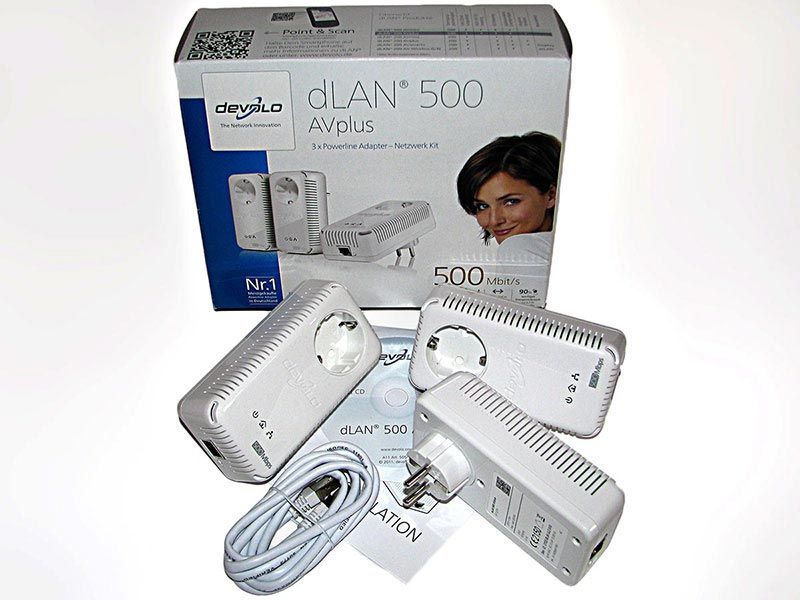
Click an image to view a larger version.
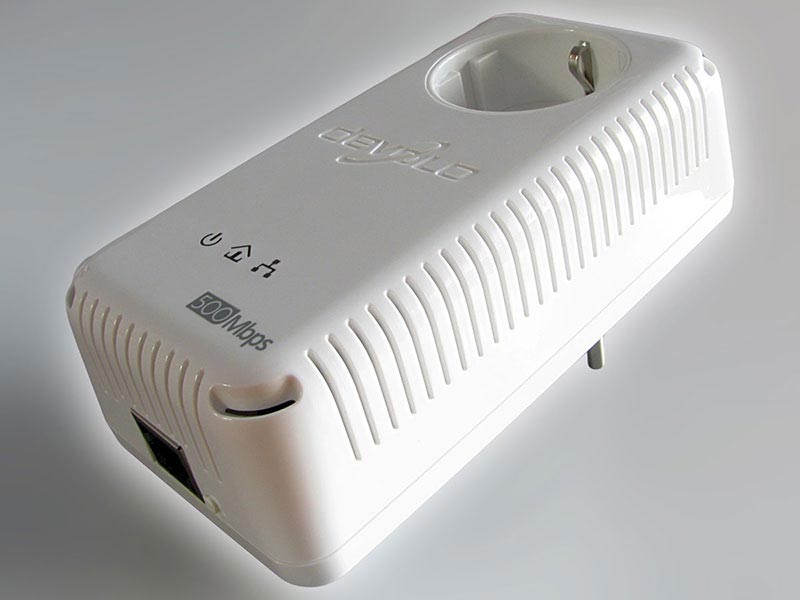
This is one dLAN® 500 AV powerline adapter. Build quality is very good. The enclosure is made of white plastic that feels sufficiently strong and rigid. The edges are clean, there is no excess molding, and the mating surfaces fit together very well. There are no squeaks or play.
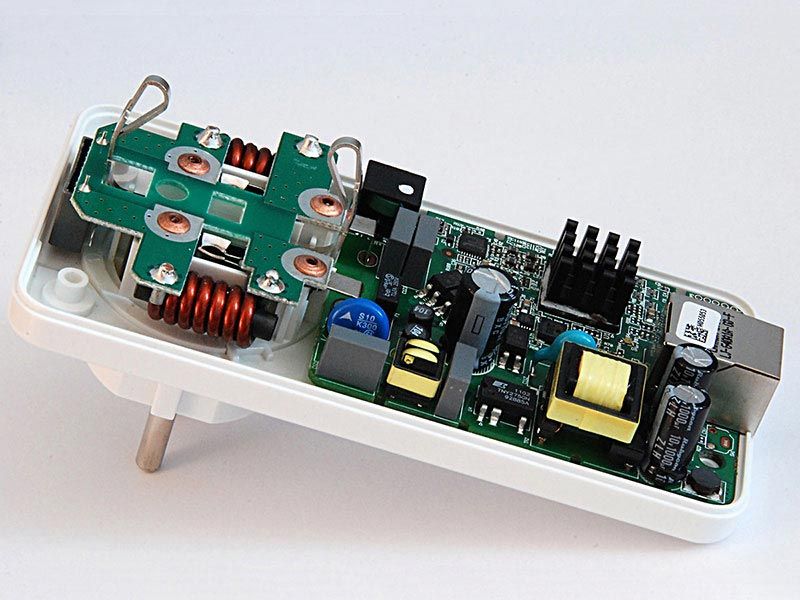
The dLAN® 500 AV powerline adapter with the top cover removed. Components are neatly installed and the solder joints look solid and reliable. Given the operating conditions and principle of the adapter, reliability is essential.
To be frank, connecting a cable from a computer network adapter to a 220 V wall outlet for the first time felt a little unsettling, so a netbook was chosen as the first test device.
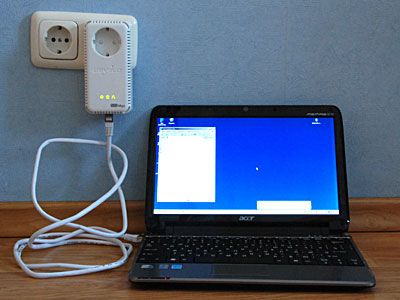
The adapter detected the other powerline adapter connected to the router within a few seconds. No configuration was required at all; nothing caught fire or started smoking, and a pop-up notification reported a connection to the local network. The first connection went smoothly, so the remaining tests were performed on desktop computers.
Test Configuration:
Test Configuration:
Distances:
Pc-1 — Router — 2 m (patch cord)
Pc-2 — Router — approx. 6.5 m (straight-line distance),
opposite walls of adjacent rooms.
Pc-1
MB: Gigabyte GA-X58A-UD7,
CPU: QuadCore Intel Core i7 930 2.80GHz (3.78GHz),
RAM: G Skill 3*2GB (DDR3-1333 DDR3 SDRAM),
HDD: SAMSUNG HD103SJ (1000GB, 7200 RPM, SATA-II), (non-system drive),
Microsoft Windows Server 2003 R2, Enterprise Edition.
Router
Linksys E3000 (Gigabit Router)
Pc-2
MB: Asus P5B Deluxe,
CPU: DualCore Intel Core 2 Duo E6300, 1.86GHz (3.15GHz),
RAM: Kingston 2*1GB (DDR2-667 DDR2 SDRAM),
HDD: ST3250410AS (250GB, 7200 RPM, SATA-II), (non-system drive),
Microsoft Windows XP Professional SP2.
Patch Cords
2 m (included) and 8 m (copper, shielded, undamaged)
File: .ISO disk image (3 402 940 416 bytes)
Folder with files: 692 files (3 148 279 808 bytes), photographs, average size approx. 4 MB.
Before testing, the adapter firmware was updated from v.5.01 to v.5.02b.
This produced a performance increase of approximately 16%.
Not a huge gain, but useful and free.
Tests:
To determine transfer speed, no benchmark “meters” were used (what exactly they measure and how is unclear). Instead, a simple and transparent method was used: copy a file / folder of files and measure the copy time. Divide the file / folder size by the elapsed time to obtain the transfer rate. Each measurement was performed three times and the results were averaged. For the calculations, 1 megabit = 1048576 bits = 131072 bytes.
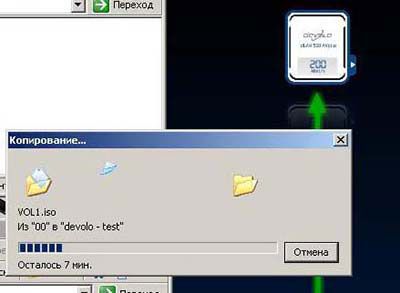
For comparison, the screenshot shows that the bundled utility reported 200 Mbit/s, while the actual copy speed was 61.7 Mbit/s. (3 402 940 416 bytes / 131072 bytes / 421 s)
Tests:
Test No. 1
Ethernet cable connection.
To check for and rule out possible bottlenecks in the test configuration,
tests were first performed over Ethernet cable. (Pc-1 → patch cord → Router → patch cord → Pc-2).
Measurement results:
1. Copying 1 file (3.16 GB) = 332.85 Mbit/s
2. Copying a folder (692 files, 2.93 GB) = 166.80 Mbit/s
It is well known that copying many files is slower than copying a single file,
but twice as slow was unexpected…
Test No. 2
Powerline adapters connected through extension cords — INCORRECT connection.
Measurement results:
1. Copying 1 file (3.16 GB) = 44.30 Mbit/s
2. Copying a folder (692 files, 2.93 GB) = 39.18 Mbit/s
Unexpectedly, the copy speed for one file and for a folder of files is almost the same
(a difference of about 10%). The larger difference in the previous test was probably caused by another limitation.
Test No. 3
Powerline adapters connected directly to wall outlets — CORRECT connection (almost).
Almost correct, because the Pc-2 outlet could not be reached, so the adapter was plugged into a nearby outlet 3 m farther away.
Measurement results:
1. Copying 1 file (3.16 GB) = 42.91 Mbit/s
2. Copying a folder (692 files, 2.93 GB) = 39.44 Mbit/s
Copy speed changed very little compared with the INCORRECT connection.
In practice, the connection arrangement had little effect in this setup.
Test No. 4
Powerline adapters connected to the same outlet (adjacent sockets) — “IDEAL” connection.
Measurement results:
1. Copying 1 file (3.16 GB) = 56.56 Mbit/s
2. Copying a folder (692 files, 2.93 GB) = 51.43 Mbit/s
These are the actual speeds of an “IDEAL” real-world connection.
On the other hand, no one really expected the advertised 500 Mbit/s in practice.
Test No. 5
TV.
There was no meaningful way to measure this scenario numerically.
So the Ethernet cable running from the router to the TV was unplugged and
replaced with a powerline adapter + patch cord.
For a week, none of the viewers noticed the change.
Movies stored on the computer played smoothly, without stuttering or delays.
The device provides sufficient performance for use with a media server or directly with a TV.
Test No. 6
Connection via IEEE 802.11g Wi-Fi (theoretical maximum speed 54 Mbit/s).
Measurement results:
1. After copying began, the system estimated a completion time that
was several times longer than in the previous tests.
There was no point in spending that much time, so the test was stopped.
Copy speed over IEEE 802.11g Wi-Fi
was several times lower than with the powerline adapters.
Test No. 7
Connection via IEEE 802.11n Wi-Fi (theoretical maximum speed up to 600 Mbit/s).
Measurement results:
1. Testing was not performed because compatible equipment was not available.
Results:
| Test Results Summary | ||
| Connection | 1 file | folder (692 files) |
| Ethernet cable | 332.85 Mbit/s | 166.80 Mbit/s |
| through extension cords (incorrect) | 44.30 Mbit/s | 39.18 Mbit/s |
| wall outlet (almost correct) | 42.91 Mbit/s | 39.44 Mbit/s |
| “ideal” (adjacent sockets of the same outlet) | 56.56 Mbit/s | 51.43 Mbit/s |
| TV / media server | sufficient speed | |
| IEEE 802.11g Wi-Fi | several times slower | |
| IEEE 802.11n Wi-Fi | not tested | |
Conclusions:
- actual speed is about 50 Mbit/s — certainly not 500 Mbit/s, but more than sufficient for comfortable everyday use;
- update the powerline adapter firmware before use — in this test it increased performance by 16%;
- copy speeds for a single file and a folder of files differ only slightly;
- in this setup, connection arrangement had little practical effect on speed;
- a TV or media server can be used without problems.